
Blog
Embedded Protection
Five P's of Personalization: How to Deliver the Right Protection to Every Customer
- 6 min read
IN THIS ARTICLE
Embedded protection places an offer to protect a trip, a shipment, or another purchase inside a partner’s own site or app, at the moment a customer is ready to buy. But a solo traveler and a family of four need different protection. Show them the same offer, and at least one gets benefits and limits that do not fit.
Cover Genius helps partners deliver personalized insurance by tailoring protection offers along five dimensions: placement, presentation, pitch, price, and product. In a Cover Genius webinar on Oct. 15, 2026, hosted by Steve Croy, Director of Product Marketing, Darin Sikanic, VP of Client Solutions Engineering, walked through what each involves, the results so far, and what it takes to get started. Watch the full session below, or read on for the highlights.
Full video transcript
Steve Croy (Director of Product Marketing, Cover Genius) [00:00:01]
Hello, everybody who’s come to join us for our webinar today, Dynamic Offers: How to Deliver the Right Offer to Every Customer. I’m your host, Steve Croy, Director of Product Marketing here at Cover Genius. I work closely with our commercial and product teams to figure out how to bring our products to market and serve you and your customers.
Today’s webinar is focused on how we take the offerings we have and tailor them to your customers, what it takes to do that, and what you can do on your side to make that possible. I’m joined by our main presenter, Darin Sikanic. Darin, could you join us in the webinar? Go ahead and give an introduction to yourself and we’ll get started.
Darin Sikanic (VP of Client Solutions Engineering, Cover Genius) [00:01:17]
Thanks, Steve. Hi everyone, I’m Darin Sikanic, VP of Client Solutions Engineering here at Cover Genius. I’ve been with the company for just a tad over eight years, based out of our New York office. It’s great to be here, and I’m excited to take you through what we’ve been working on: our Offers API, and some of the other ways to integrate through Elements and Journeys.
In terms of the agenda, we’ll cover what personalization means in the context of our partnerships and Cover Genius as a whole. Then we’ll look at how you unlock the features we’ve built to enable different types of personalization across different dimensions. And then how you control what your customers see in terms of the product, how we do pricing optimization, and the content and UX features.
Let’s start with a quick summary of what personalization means in this context. It means customizing the offer to best fit the customer. At Cover Genius, we think about it in terms of the five P’s.
First, placement: where in the checkout flow the offer appears. Most partners have the protection panel placed somewhere within the checkout experience, but you can also add it post-checkout, or further up the funnel on a search page. You can also follow up with a customer by email, with a link to a standalone page where they can attach protection if they decided not to buy it during checkout. That’s what we mean by placement.
Second, presentation: how does it look? The layouts, the positive call to action, how big it is, the negative call to action, and elements such as trust badges like “popular choice,” and how the benefits are shown to the customer.
Third, pitch, which is the content. This is the headline and the benefits. Do we list out the limits? Do we add a trust disclaimer at the bottom about how many other travelers or purchasers decided to buy the protection product?
Fourth, price. Price is about serving the best price for that customer, depending on the data we get. This can be done in many markets around the world. Essentially, we’re optimizing between a floor and a ceiling price for that particular cohort of customers.
And fifth, product. This is the combination of the benefits and limits presented to the customer. We have a wide variety of products sourced from our network of underwriters at Cover Genius, so it’s about surfacing the right product for that customer at the right time.
Those are the five P’s of personalization, and we’ll get into how we unlock them.
First, experimentation and how it’s helped our partners to date. We’ve had tremendous success with this. $20 billion in sales have been optimized since these capabilities began, and we’re seeing around a 40% average GWP uplift within six to twelve months. We’ve run thousands of experiments across different partners, products, markets, price points, content and UX. We’re experimenting with over 50 global partners today, and we continue to add partners day by day.
Integration options: Offers API, Elements and Journeys
Darin Sikanic
So how do we unlock personalization? There are a few ways to integrate with the Cover Genius ecosystem of APIs. There are three key approaches that most partners lean towards, and they enable personalization and optimization.
First, the API. This is what most partners are familiar with: quote and bind for our protection products. With the Offers API in particular, we can now do that in an even easier way, by taking away a lot of the insurance complexity you might face with the current integration.
When it comes to Elements, what is that? It’s a platform-agnostic software development kit, which is a fancy way of saying a piece of code that lives within your site, or even mobile app, and does the heavy lifting of rendering the panel for you. It surfaces the content that is returned via the API, so you’re still doing an API integration, but all of that front-end engineering effort is taken off your teams and delivered and rendered via Elements.
Then we have Journeys. Journeys is an extension of Elements. Along with rendering the protection panel, it can also render the form fields you might need to collect data points in order to get to the point of surfacing a quote. In addition, it can render a payment form, so that Cover Genius can be merchant of record if you wish. This is really powerful if you’re running a mobile app, or if you want a very light-touch integration option to just get started and get some feedback from your customers.
How the Offers API works
Most partners are integrated today through our quote-and-bind API, and we’ve upgraded that to what we call the Offers API. It’s a very similar flow, as we’ll see a little later.
Here’s what we learned from our partners and their developers. They have to program in insurance-specific logic, such as the policy start date, and they have to request a particular policy type. And if you want to surface multiple products, you have to repeat the data points multiple times, once per product.
We took that feedback on board and delivered the offers engine, which powers our Offers API endpoints. It takes these data points on board just once, removes some of that insurance logic, and gives you back the right product at the right price, with the right personalization applied. This lets you and us move a lot faster in launching new markets and new products and running these optimizations, and everything stays very safe.
What does that look like? This might look like gobbledygook to some, but it’s the JSON payload typically sent by some of our travel partners. As you can see, they specify the policy type, the policy type version, potentially the policy start date, and so forth. We want to remove that and just have this context object: the data you have on hand that makes sense to you. You send us that data, and in the response we send back the valid products, the product rules, and the content. The product information is returned in order to enable some interesting types of journeys, such as upsells and cross-sells.
The content matters because, with our existing APIs, you had to source the content from multiple locations within the response payload. Now the content is returned in a single block. That lets you either create the UI yourselves or, with Elements, process the content that comes back, along with something we call the presentation profile, to render the protection panel on your site.
The flow looks very similar to what a lot of partners have implemented today with our quote and booking endpoints. Instead of the quote endpoint, it’s just changed to offers, and the payload and response schemas have changed ever so slightly. The opt-out endpoint is still an important one that we ask partners to send, so that we can capture the attach rate and the optimization and personalization work more smoothly. Then there’s the confirm endpoint, which is akin to the booking endpoint. You send us the policyholder information and actually buy the insurance policy.
To recap: your system collates and sends us details and context related to that particular journey, shipment or product. We surface the right, optimized product for that customer at the right price for their market, with correct content that our compliance team has signed off on. The rendering is then done on your side. You can either source the content directly from the API and render the UI elements through your own code, or use Elements, which is an open source SDK that we’re going to deliver. We’re making the source available so that it’s a lot more secure and you can do static code analysis on it, as we heard that security was paramount. It renders the panel a lot faster and with a lot less engineering effort on your side.
Recapping Elements, it’s the same thing we just discussed (I forgot to flip to this page): it does the heavy lifting of showing that panel. Journeys is about the cases where you don’t collect particular data points, or you want to quickly test out a new insurance touchpoint, maybe in a post-checkout experience. You can use Journeys to render the end-to-end experience: collecting the data, rendering the protection panel, collecting payment, and then issuing the policy.
ProgramView: touchpoints, segments and experiments
Darin Sikanic
So how is the Offers API used? Here’s an example of how different customers see different products. A family of four and a solo traveler deserve different sets of benefits and limits. Depending on the context sent through the integration, our offers engine returns the most relevant product. A family of four would potentially need higher limits and more benefits than a solo traveler. The offers engine reaches into our suite of products from our panel of underwriters and returns the most relevant one. Then Elements or Journeys renders the protection panel for your customers to choose protection.
The question is, we have these technologies to render these views, but how can you see what’s going on before your customer sees it? How can we give you that control? That’s where ProgramView comes in. ProgramView gives you complete visibility and control into what offers are presented to your customers. Let’s take a tour.
Touchpoints. Touchpoints let you define where in your ecosystem protection is surfaced. Here we have a travel partner who has integrated Elements directly into the checkout experience, and who uses our standalone solution to follow up post-purchase with customers who opt out of insurance. We only know this because the partner is sending us opt-out data.
Segments. Segments are super important. Clicking into touchpoints brings you to the main ProgramView page, where you can see the segments that are defined. In ProgramView, every segment is a card showing who’s in it, which products they see, and which panel they see. These groups have always shaped what your customers see. What’s new is that they’re named and visible to you.
Experiments. You can also view the performance of experiments relating to a particular segment. This is where you find out what’s actually working.
ProgramView is available today in our Partner Portal. If you haven’t logged in to the Partner Portal, please reach out to your Partner Growth Manager or Client Solutions Engineer, and they’ll be happy to get you set up and acquainted with all the features we’re releasing there. Most importantly, we want to give you control over as much as possible, including which products are returned, the look and feel of the offer, and the compliant content that gets surfaced.
Today, this is a request form, and our teams turn it around for you. We do a lot of work behind the scenes to get the design and content approved and ready to go. But self-service is coming soon. Soon you’ll simply log in to the Partner Portal, go to ProgramView, and select a new product we release, such as weather protection, and it should be live.
ProgramView answers two questions we’ve been hearing from partners. The first is: what’s configured? You get your whole program on a single page: every touchpoint, every segment, every product, with a status and a link straight through to performance. You and your Cover Genius team are looking at the same view, so what’s live becomes a link instead of an email thread or a Slack thread, as we’re used to.
The second question, and the one I’m most excited about, is: what’s possible? ProgramView doesn’t just show you what you have, it shows you what you’re missing. Where in your customer journey could you be presenting an offer, but aren’t? What’s already working for similar programs that you could switch on? Which experiments do you want to opt into? Now you can see what’s live, see what’s possible, and ask for changes in one click.
That’s how this personalization works. Steve, I’ll hand it back to you to see if there are any questions.
Q&A and closing
Steve Croy [00:18:26]
Thanks, Darin, and thanks for sharing all that. It’s exciting what is possible today and how easy it is for our partners to access the power we’re building for them. We’re entering Q&A, and there are some questions. I’ll bring up a couple for you, Darin. How much effort does it take to migrate to one of these integrations and unlock personalization? What are we looking at?
Darin Sikanic [00:19:15]
Very little effort. As we saw earlier in the request and response, the changes are minimal. We built the new Offers schema and functionality in conjunction with several partners, who gave us feedback along the way. It improves the developer experience so you can get up and running very quickly and migrate across very simply. What we’re seeing from partners who have already made the switch is pretty much one sprint, so two weeks, depending on how long your sprint cycles are.
Steve Croy [00:19:59]
Awesome. That answers another question about the time it takes, so that’s helpful. Another question I’m seeing: what can we do for ourselves today to migrate to this integration and unlock personalization? Is there a self-service option? How do we get started?
Darin Sikanic [00:20:38]
Already today, through the Partner Portal, you can explore experiments. If you don’t have access, please reach out to your Partner Growth Manager or Client Solutions Engineer. There’s a wealth of functionality there. You can create segments, view what’s working across the board, and run and initiate experiments if you’re already on the Offers API. So the first step is making the switch to the Offers API, and then using what we already have in the Partner Portal to see what’s possible in terms of experimentation.
When it comes to changing the UX and content, as we saw in ProgramView, you can see everything there and make the request process a lot simpler than reaching out to your Partner Growth Manager via Slack or email. It’s directly in the Partner Portal. Once you submit that form, we get a notification and can start work immediately, and give you a timeline for releasing that new panel, new content or new product. As I mentioned earlier, we’re working hard in the Merchant Products team to develop functionality that lets you self-serve all of this. It won’t be a form anymore. It’ll be drag and drop, and away you go.
Steve Croy [00:22:04]
Great. Listening to this so far, we have the Offers API, Elements and Journeys, and they all seem to unlock the same level of quality of outcomes. One question I’m seeing is: if we’re just getting started, which option should we pick? Do they pick one and that’s it? Can they make a different decision later? I think that’s what they’re trying to get at.
Darin Sikanic [00:22:50]
Underpinning everything is the Offers API, so that would be the best way to get started. Layering Elements on top of that is super simple. So you might do the Offers API, and then decide, “I want to lessen the burden on my front-end engineering team,” and reach for Elements. That’s perfectly fine. Today it works on web, and we’re developing the SDK for iOS and Android, which will be released shortly. That lets you take a burden off your front-end engineers, do a quick migration across, and get started.
Journeys is really powerful when it comes to post-purchase, as we saw: creating an entire journey just for the purposes of insurance. Insurance in the checkout experience typically lowers the attach rate of the main purchase, so we want to make this a post-purchase or follow-up journey for when the customer has chosen to opt out, but keep them within the ecosystem. It’s all about adding additional touchpoints with Journeys.
Steve Croy [00:24:00]
That’s a really great insight. Those are all the questions I have from the audience. Thank you for joining us. This has been really educational for me, and hopefully for you. We hope to hear from you soon. As Darin mentioned, if you want to take the next step, it’s a very simple conversation with your Partner Growth Manager and your Client Solutions Engineer on Darin’s team, to move that conversation forward and work out the right option for you and your team. Thank you so much, Darin, for your time, and thank you to our attendees for joining us today. I hope you had a great session.
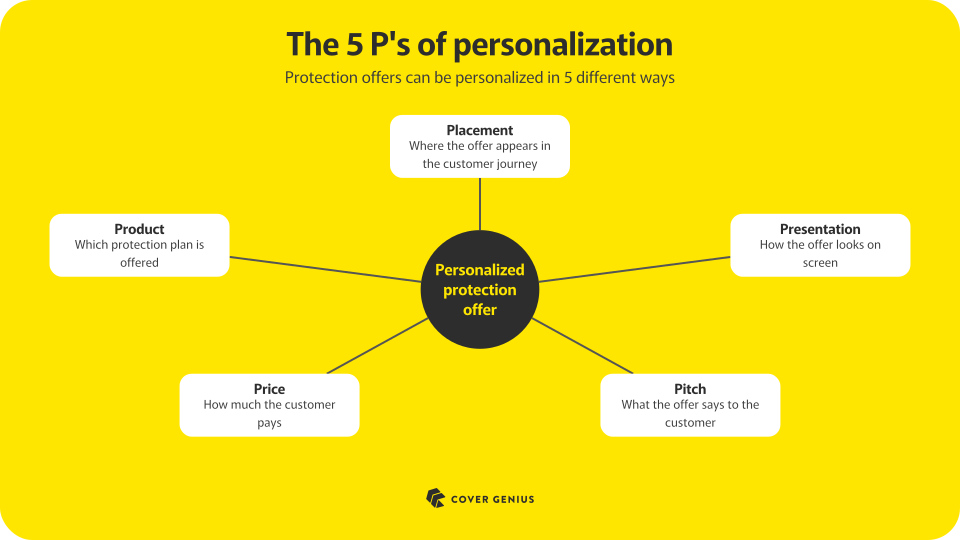
The five P’s of personalized insurance
The five P’s are Cover Genius’s framework for customizing a protection offer to best fit each customer. Each P is one decision about the offer: placement is where it appears, presentation is how it looks, pitch is what it says, price is what the customer pays, and product is what it includes. Cover Genius runs experiments on these decisions with partners to find out what works and what doesn’t.
Placement
Placement is where in the customer journey the offer appears. Most partners put the protection panel somewhere in checkout. It can also appear earlier, such as on a search page, or after checkout. A follow-up email with a link to a standalone page gives customers who skipped protection at checkout a second chance to add it.
Presentation
Presentation is how the offer looks. That covers the layout, the size of the positive call to action, the negative call to action, trust badges such as a “popular choice” label, and how the benefits appear on screen.
Pitch
Pitch is the content: the headline, the benefits, whether to list the limits, and whether to add a trust message at the bottom that shows how many other customers chose the protection.
Price
Price is optimized for each group of customers based on the data available about them. In many markets, Cover Genius optimizes between a floor and a ceiling price for each group.
Product
Product is the set of benefits and limits a customer sees. Limits are the maximum amounts a policy pays. Cover Genius sources a wide range of products from its network of underwriters, so a partner can show each customer the one that fits. A family of four, for example, may need higher limits and more benefits than a solo traveler.
What experimentation has delivered
Cover Genius has run thousands of experiments on products, markets, prices, content, and user experience, and it works with more than 50 global partners today.
According to Darin Sikanic, VP of Client Solutions Engineering at Cover Genius, $20B in partner sales has run through optimized offers since the capabilities launched. Cover Genius is seeing an average gross written premium (GWP) uplift of around 40% within 6 to 12 months.
How to unlock personalization
Until now, developers integrating a quote-and-bind API had to program insurance-specific logic into their own systems, such as the policy start date and the policy type. Showing several products meant repeating the same data points once per product. Partners and developers flagged this as a pain point.
The Offers API removes that burden. A partner sends a single context object with the data it already has, such as trip details or the size of the travel group. Cover Genius sends back the valid products, the product rules, and the content in one block already matched to that customer’s context. The flow has three steps:
- Offers replaces the quote step and returns the optimized product, price, and content for that customer.
- Opt-out tells Cover Genius when a customer declines protection. That data lets the platform capture attach rate and gives optimization the information it needs.
- Confirm replaces the booking step, where the partner sends the policyholder information to issue the policy.
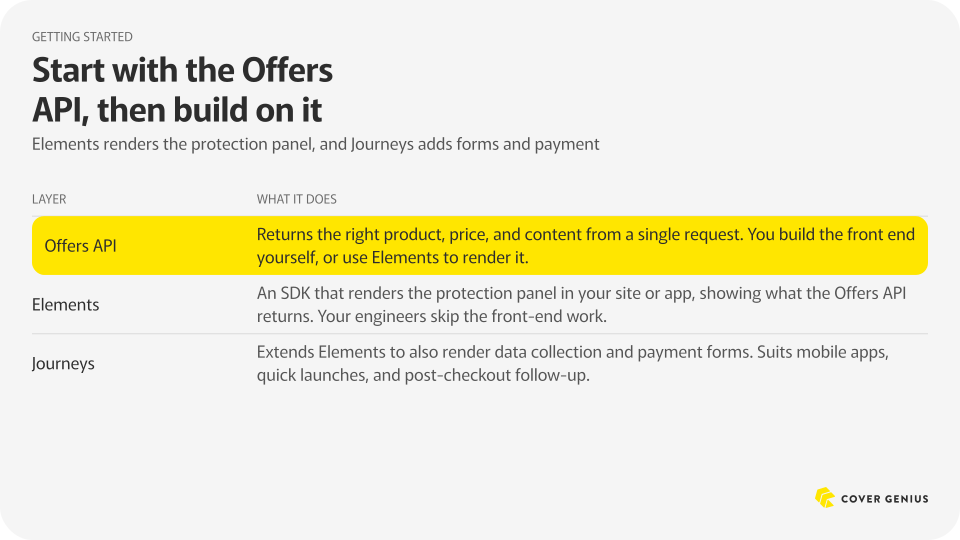
The Offers API sits underneath everything else, so it is the best place to start. Elements builds on it with a ready-made protection panel, and Journeys extends Elements to add data collection, payment, and follow-up touchpoints.
Control what your customers see with Program View
As a Cover Genius partner, you can see a personalized offer before your customers do. Program View, a feature of Partner Portal, gives you complete visibility into the offers presented to them. Partner Portal is also where you explore experiments, create segments, and see what is working, and your Partner Growth Manager or Client Solutions Engineer sets up your access.
It has three parts:
- Touchpoints show where protection appears across your ecosystem, such as an Elements panel in checkout plus a standalone page that follows up with customers who opted out.
- Segments appear as cards that show who is in each group, which products they see, and which panel they see. These groups already existed behind the scenes. Program View now names them and shows them to you.
- Experiments show how each segment performs, so you can see what is working.
Program View also shows what is missing. It highlights where in the customer journey you could present an offer but do not, what is already working for similar programs that you could switch on, and which experiments you could opt into. You and your Cover Genius team look at the same view, so what is live becomes a link instead of an email or Slack thread.
Today, partners request changes to products, look and feel, and compliant content through a form, and Cover Genius teams turn it around. Self-service is coming soon. When a new product such as weather protection launches, a partner will be able to log in, select it in Program View, and it should go live.
Start personalizing your protection offers
Partners already using Cover Genius’s quote-and-bind API can switch to the Offers API in about one sprint. The flow stays the same, and the request and response formats change only slightly. Cover Genius built the Offers API with feedback from several partners to make the switch simple. Partners that have already made the switch report about two weeks, depending on sprint length.
A suggested path for personalization looks like:
- Integrate the Offers API, and send opt-out data so attach rate and optimization work from day one.
- Add Elements if you want to lighten the load on your front-end engineers.
- Add Journeys when you want a new touchpoint, such as a post-purchase or follow-up experience.
From there, Program View shows the experiments and segments available to you, and your Cover Genius team can start on changes to products, content, and design.
See how personalized insurance would work for your program. Whether you are already a partner or just exploring, the next step is a simple conversation with the Cover Genius team. We can walk you through how personalization could work for your business.
Related Articles

Embedded Insurance Market Trends: What’s Driving Growth

How to Sell Bancassurance Products: A Digital Distribution Playbook

What Is Embedded Protection?
Get in touch
All we need is some quick background info to understand how we can best help.